FlowMate
An audio-guided timer built around one intent
Built solo: product strategy, full-stack engineering, audio system design, and character illustration — from first sketch to shipped app on web and Android.
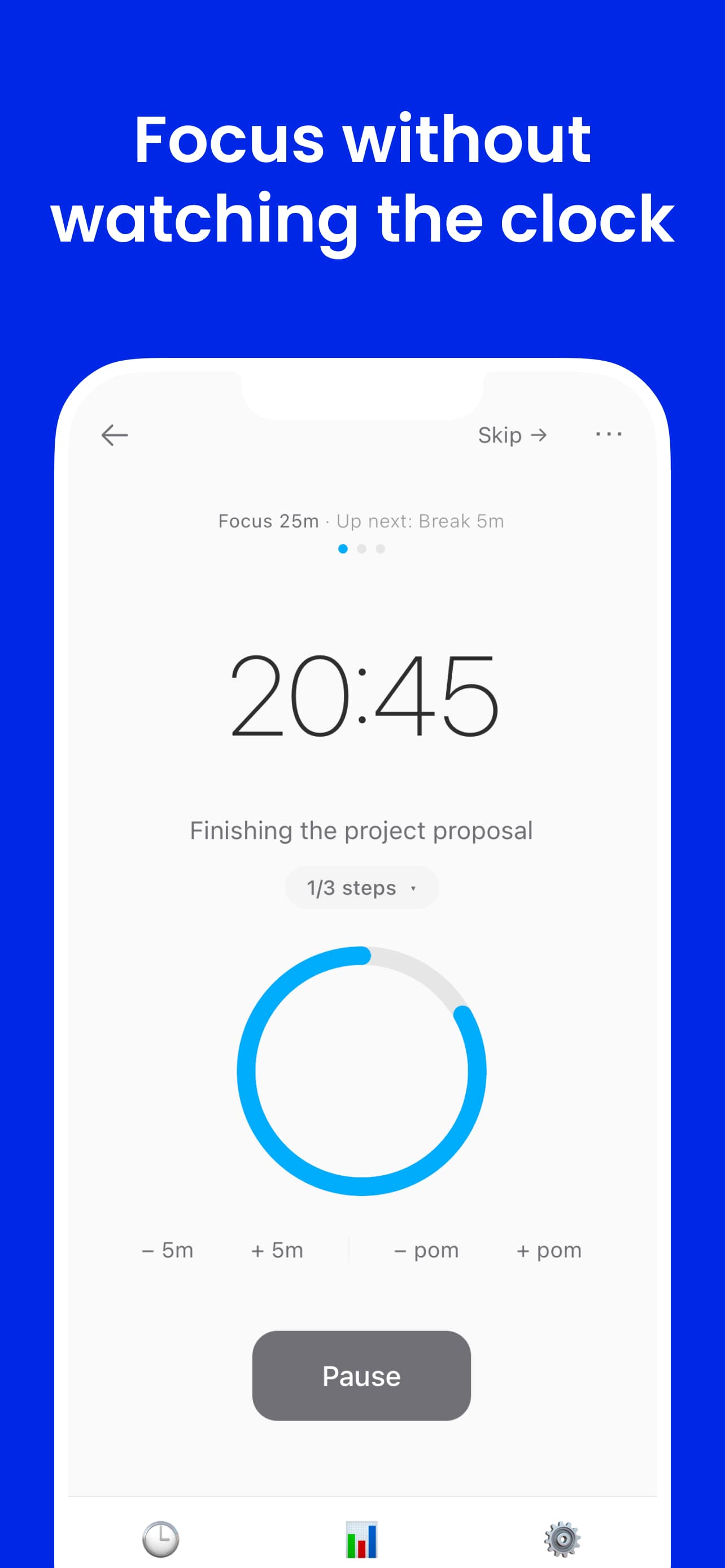
Most timers ask you to watch them. FlowMate delivers time awareness through audio — spoken cues that keep you oriented through the arc of a session without pulling your attention away from the work. Before each session starts, you name one thing you're focusing on. That single intent anchors the session, and the timer runs from there.
Visual Layer
Flowmato — visual reinforcement
When you are looking at the screen, Flowmato reflects where you are in the session. It is the visual counterpart to the audio system — not the primary mechanism, but a reinforcing layer for the moments when your eyes are on the app. The character and the cues represent the same underlying state through different channels.
Hand-drawn character exploration
Started with pencil silhouettes to lock in personality before touching code. The tomato shape solved two problems at once: instantly readable as Pomodoro without being literal, and the round form naturally supports expressive facial states. I sketched the character in Procreate on iPad, building in layers — rough pencil sketch, then linework, then shading.

AI as a divergence tool
Used AI image generation to rapidly stress-test silhouette readability, emotional clarity, and pose range — not to produce final assets, but to compress divergent exploration. Generated ~60 variations in under an hour to evaluate and discard directions that would have taken days to sketch. The questions driving each batch were specific: does this pose read as focused or strained at small size? Does the eye shape communicate warmth and support?

Mapping states to the session arc
Each visual state maps to a real moment in a focus session. The design constraint was precise: posture, expression, and animation had to communicate a distinct phase — immediately and without text labels. The four states mirror the same arc that audio cues demarcate, so both channels reinforce each other.
Session arc — hover to explore

Idle
Pondering between sessions
- —Idle: ❤️ floats upward. A slow breathing pulse — welcoming, not urgent. Flowmato is thinking.
- —Focused: Wired glasses on, eyes fixed on the laptop. No ambient motion — stillness signals intensity.
- —Break: Sunk into a bean bag with a matcha latte. Earned rest reads as reward, not obligation.
- —Celebrating: Bouncing up and down with confetti flying. The session ended — Flowmato marks the moment.
Growth System
Flowmato grows across a session — a visual progress signal for the moments when you do look at the screen. It accumulates in parallel with the audio layer, reinforcing the same arc.






Watch it grow
Flowmato growing — live session
The Problem
Clock-checking and scattered intent both break focus.
Standard timers display time. They don't deliver it. To know where you are in a session, you have to stop, look, and reorient — an attention shift that compounds across every check. In deep work, that interruption breaks flow. In physical tasks — cooking, working out, cleaning — it isn't even possible.
The second problem is fuzzier but just as damaging: starting a session without a clear anchor. You open a timer with a vague sense of what you're doing. Ten minutes in, you've half-answered an email, half-fixed a bug, and checked Slack once. The time was spent, but nothing was actually finished.
FlowMate addresses both: time awareness comes to you through audio, and each session begins with a single named intent.
Product System
Three interacting systems
FlowMate is built around three distinct but connected subsystems. Each one addresses a different failure mode of the standard focus timer.
Spoken cues that deliver time across the arc of a session — seconds, minutes, halfway, countdown. The timer runs without requiring a glance.
Each session starts with one named goal. Optional step breakdown up to five items — enough structure to begin, not enough to plan instead of do.
Add time, extend into another pomodoro, end early, or resume an unfinished task from history. Sessions adapt to real work — not the other way around.
System 01
Audio time awareness
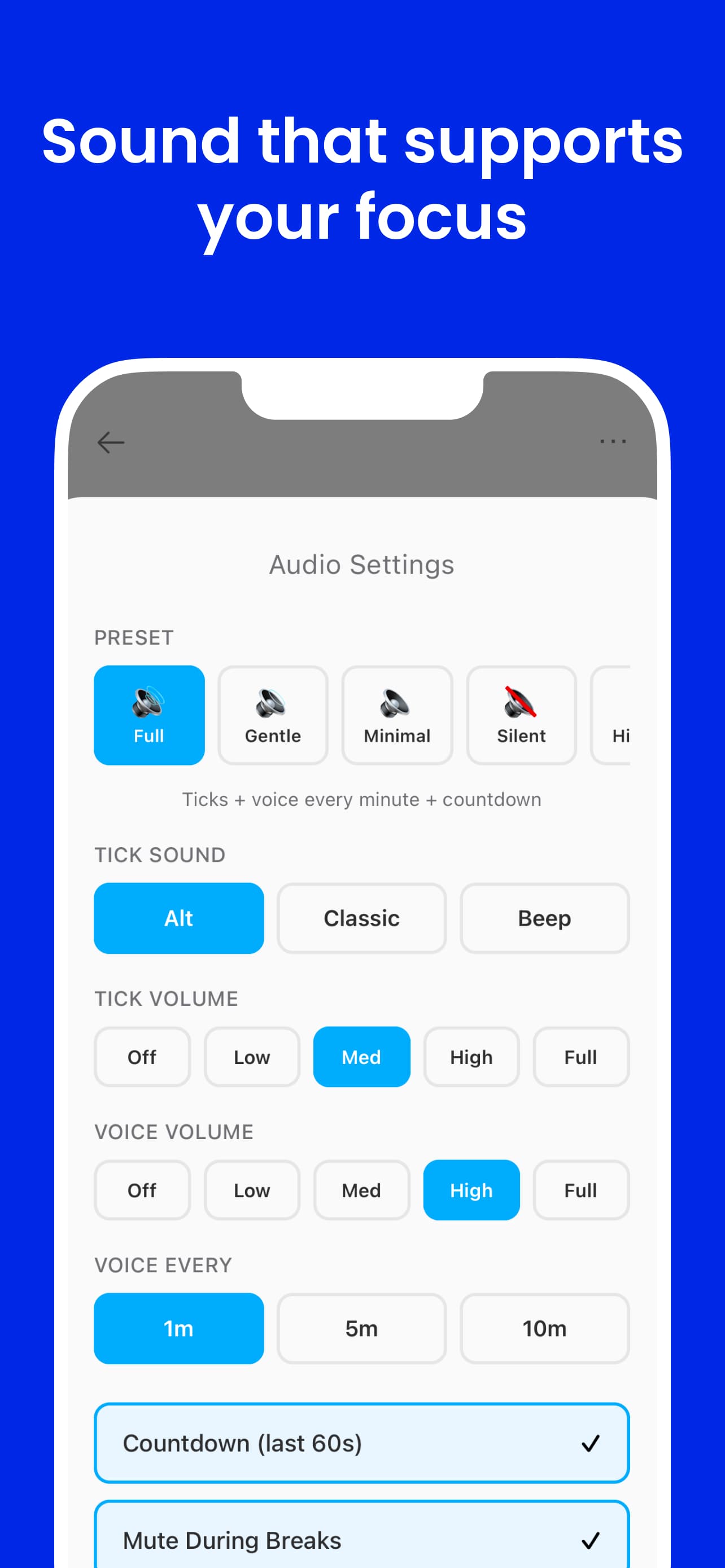
The primary interface is sound. FlowMate schedules voice cues across the arc of a session — not as notifications, but as ambient time markers that maintain orientation without demanding attention. The timer is fully usable without looking at a screen.
Fine-grained audio markers within the final stretch of a session — subtle ticks or brief tones that signal the passing of seconds without requiring a glance.
Spoken reminders at key minute intervals — "10 minutes remaining", "5 minutes remaining" — delivered in your chosen voice and cadence. The session speaks for itself.
A single spoken cue at the session midpoint. Knowing you are halfway through reorients effort without requiring a clock check — often the most motivating moment in a session.
Spoken countdown in the final seconds — 3, 2, 1. Prepares you for the transition rather than cutting you off cold. The end of a session feels deliberate, not abrupt.
Five audio presets — click to explore
All cue types enabled — seconds markers, minute calls, halfway point, countdown. Maximum time awareness.
Works when you are not at your screen
System 02
Focus intent
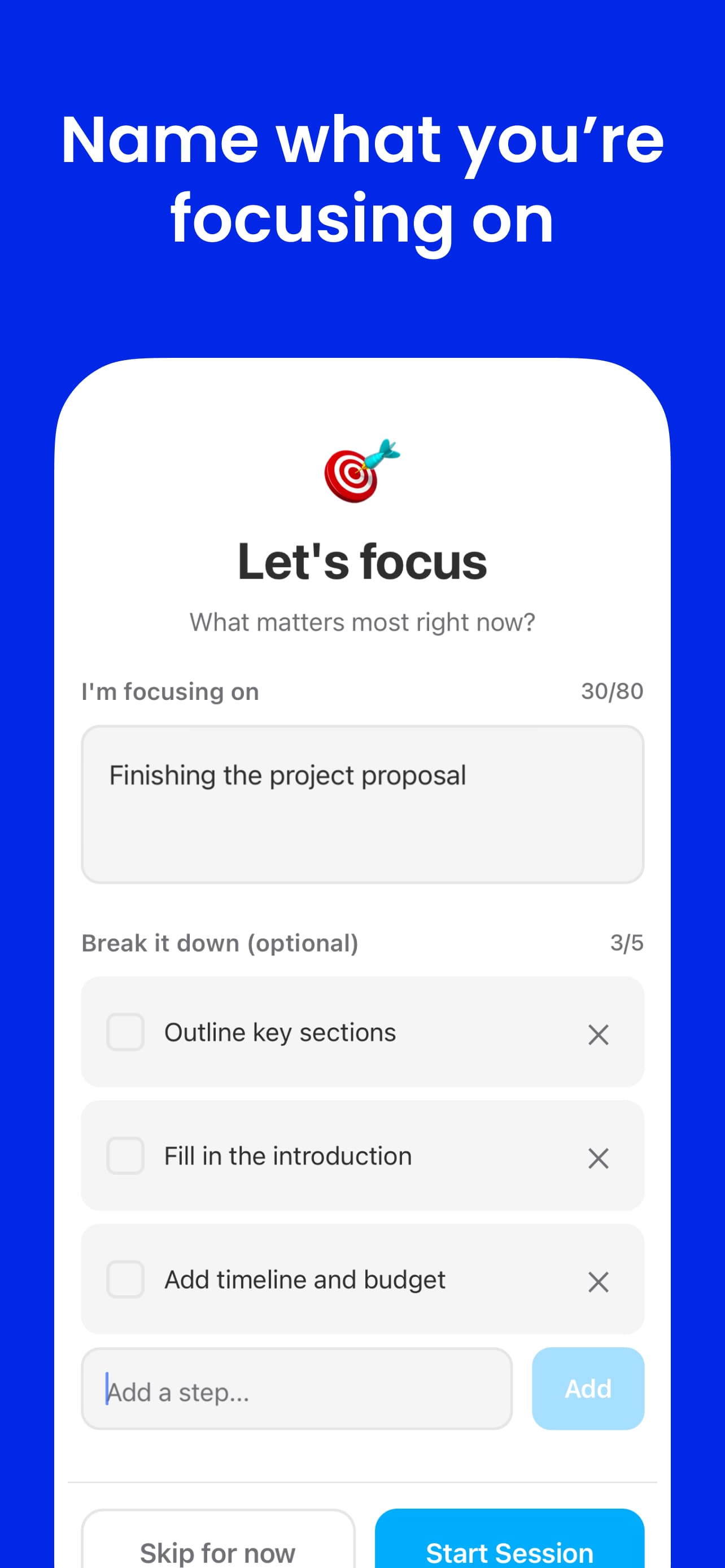
Each session starts with a single named goal. The intent is set before the timer begins — not mid-session, not after the fact. This small friction point is the product. It forces a moment of clarity before committing time.
One goal per session
A single text field that asks: what are you working on? Not a project, not a list — one concrete thing. Naming it out loud (even to a timer) reduces the pre-session drift that pulls attention in multiple directions before work even begins.
Up to five steps
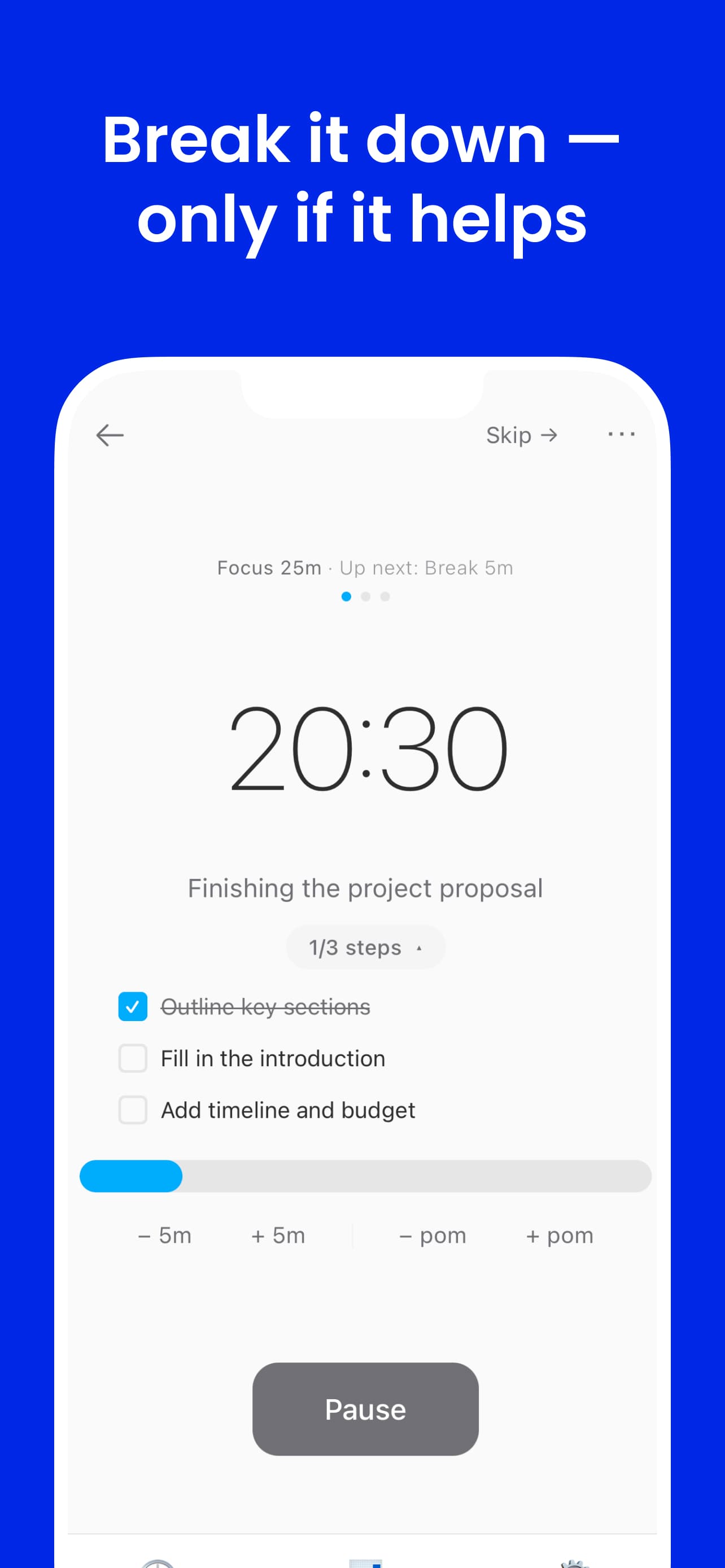
If the goal needs breaking down, users can add up to five sub-steps. The limit is intentional. Five is enough to clarify the path without turning the timer into a task manager. The constraint keeps setup fast and prevents over-planning as a form of avoidance.
Designed to start — not to organize
The intent system exists to reduce activation energy, not to track everything. It surfaces only when you initiate a session, disappears while the timer runs, and doesn't accumulate into a backlog. FlowMate is not a to-do app.
System 03
Flexible sessions
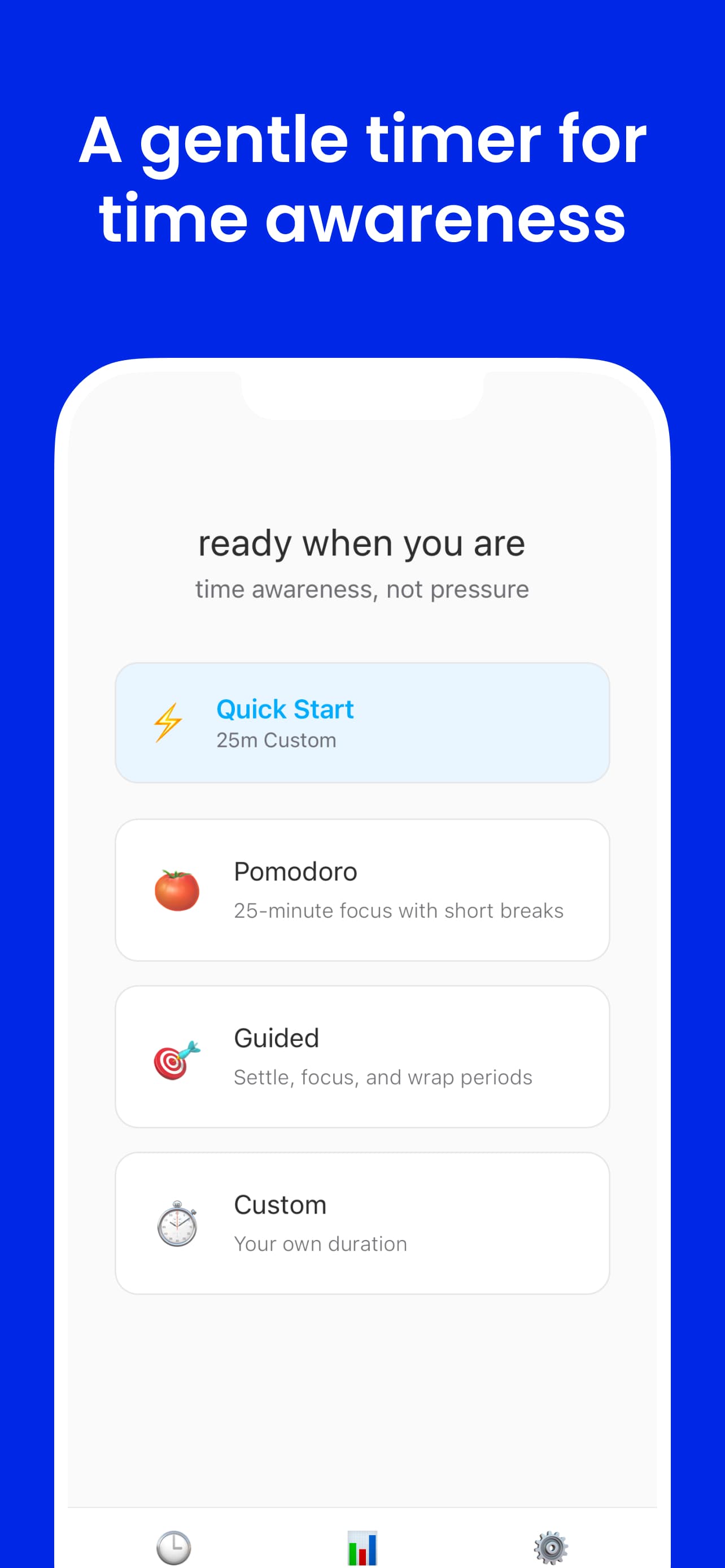
Real work rarely fits a clean 25-minute block. A strict Pomodoro forces you to either stop mid-thought or ignore the timer entirely. FlowMate treats session boundaries as suggestions that the user controls — not hard stops.
Add more time
Extend the current session without breaking rhythm. If you're in the middle of something, one tap buys more time and the audio cues recalibrate to the new duration.
Extend into another pomodoro
Chain sessions together when the work calls for it. The state machine handles the transition — a new timer begins with the same intent already set.
End early
Finish when the work is done, not when the clock hits zero. Ending early is not failure — it means the session served its purpose. The session is logged either way.
Resume from history
Unfinished tasks are saved to history. If a session ends before the goal was met, it can be picked up in the next session — with the same intent and step list intact.
Engineering
One state machine driving three synchronized outputs
Core challenge
Keeping audio cues, visual state, and Picture-in-Picture behavior synchronized — across web and Android — without brittle event-handler chains or platform-diverging logic.
How I solved it
- Modeled the session as a single timer state machine — one timerPhase value drives audio scheduling, character state, and PiP simultaneously
- Audio cues are scheduled declaratively from elapsed time and duration — not imperatively from UI events, so they cannot drift out of sync
- Focus intent and session control (add time, extend, end early) are explicit state transitions — not side effects
- Shared timer logic in @flowmate/shared runs identically on web and Android; only the render target differs
- Timer state machine: Session lifecycle — idle, intent-setting, running, paused, break, complete — is modeled as explicit states. Flexible session controls (add time, extend, end early) are transitions, not ad-hoc mutations. New states require one config entry, not rewiring event handlers.
- Audio cue scheduling: Cues are computed purely from elapsed time and session duration. Adding a new cue type means adding one rule to the scheduler — no UI wiring needed. Audio and visual outputs share the same timerPhase source, so they cannot fall out of sync.
- Cross-platform shared logic: Web (Next.js) and Android (Expo) share business logic via @flowmate/shared in a Turborepo monorepo. Timer rules, state machine, and audio triggers live once and run on both platforms. Platform-specific code handles only rendering and native APIs.
- Preset-based audio system: Five presets (Full, Gentle, Minimal, Silent, Hi-Fi) control cue density and voice character. The preset layer sits above the scheduler — same cue logic, different output rules. Switching presets doesn't reload audio files.
- Document PiP API: Timer floats in a picture-in-picture window — persistent while working in other apps. Character state updates from the same timerPhase, so PiP and the main UI never diverge.
- ElevenLabs TTS pipeline: 40+ voice cue files generated, catalogued, and mapped to timer events. Audio was treated as a first-class interface layer from the start — production quality, not prototype sound.
Design Psychology
Two channels, one signal
Audio and visual outputs represent the same underlying session state through different modalities. Audio delivers time awareness passively — it reaches you wherever your attention is. Flowmato delivers it visually — for the moments when you do look at the screen, the character reflects where you are without requiring you to read a number.
The design goal was a timer that stays out of the way until it has something worth saying. Audio cues are the primary mechanism for that — they are scheduled, purposeful, and brief. The character adds a layer of relationship to the visual surface: Flowmato in Focused state — still, intense, no ambient motion — mirrors back the quality of attention you are trying to maintain.
Neither channel creates pressure. Both reinforce structure. The combination is calm presence — a system that supports focus without inserting itself into it.
The App
Shipped on Android & Web
iOS · In ReviewAll platforms share the same timer logic, state machine, and audio system via a shared monorepo package. Android is live but unpromoted — holding until iOS ships so both platforms launch together.
Tech Stack
Results
What shipped and what I learned
Early testers responded most strongly to the spoken cues — not the character. Knowing the timer would tell them when it mattered meant they stopped checking. That validated the core premise: audio awareness changes how you relate to a timer, not just how you see it.
Audio cues drive behavior change
Early testers cited spoken cues as the primary behavior change — they stopped checking the clock. Designed so the timer is fully usable without looking at the screen.
Audio as a first-class interface
40+ ElevenLabs voice cues with five configurable presets. The system was designed so the timer is fully usable without looking at the screen — cues deliver time awareness while your attention stays on the work.
Shipped cross-platform
Web, iOS, and Android are all live, sharing business logic via @flowmate/shared. Available on the App Store and Google Play.
Design and code in the same hand
Character designed, SVG paths drawn, animation spec written, and component implemented by one person. No translation layer between design intent and shipped behavior.
State-driven architecture paid off
Modeling everything from a single timerPhase value meant audio cues, visual state, and PiP stayed synchronized. Adding a new state required one config entry — not a chain of event handlers.
What I'd do next
Open questions worth testing
- Measure whether audio cues alone — without the character — are sufficient for certain users and contexts. The hypothesis is that audio is primary; the character is additive. That needs data.
- Adapt cue density to session length. A 5-minute sprint and a 90-minute deep work block have different rhythms — the scheduler should reflect that without manual configuration.
- Personalize voice tone and cue timing based on session type: deep work, admin tasks, and physical activities each have different attention patterns.
- Explore adaptive cue timing based on subtask progress — if tasks are tracked, cues could acknowledge completion rather than only marking elapsed time.
- Explore a web-based social layer: ambient awareness of others in session, without chat or notifications.